Built for busy founders
Namelist catches every lead, reminds you of every follow-up and keeps every deal moving, so nothing slips through the cracks and you spend the day selling instead of chasing.
No more spreadsheets, sticky notes or forgotten callbacks. Call from a business line, text a whole list at once and see what every rep did today.
Book a 10-minute call (no cameras)
14 days free
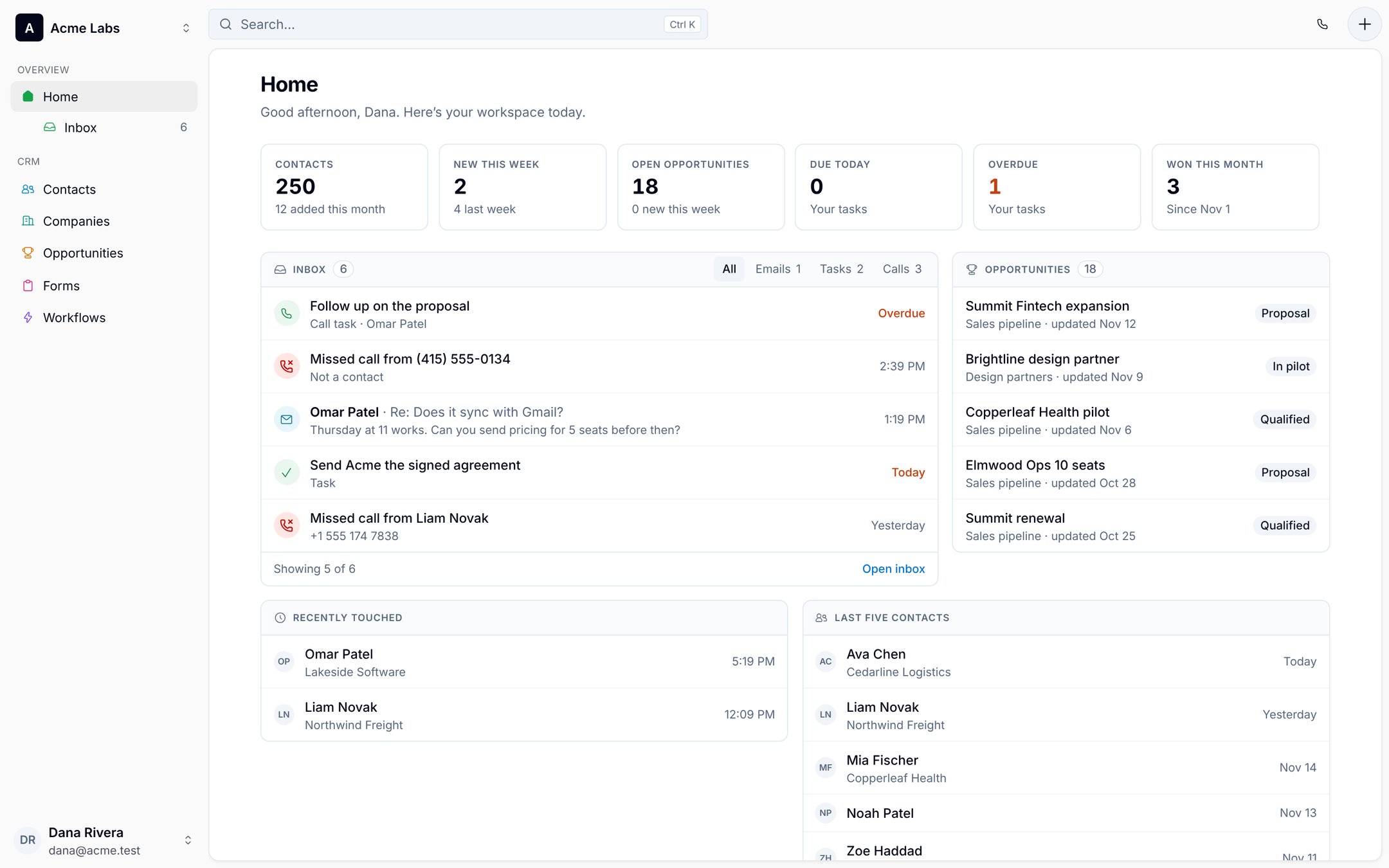
Built for the stage when the founder is the sales team
Pre-seed to seed
Finding the first 10 customers
Every intro, call and reply in one place instead of your inbox, a spreadsheet, a Notion page and Apple Notes.
Seed to Series A
Making sales repeatable
Turn what worked into a pipeline and workflows anyone can run.
First sales hire
Handing off without losing context
Your rep inherits every thread, call and note, not a cold list.
Teams of 2–10
Selling together
Shared pipeline and reports, with co-founders and advisors free as read-only.
Why founder-led sales stalls
Deals don't die because you pitched badly. They die in the week you were busy shipping.
You sell between standups, investor calls and support tickets. The pipeline lives in your inbox, a Notion database you last updated on Sunday and an Apple Note called “follow up!!”. Namelist pulls it together and does the remembering for you.
Leads scattered across Gmail, Notion, Apple Notes and a sheet
Every conversation lands on the right person, automatically.
Connect Gmail and your calendar once. Email, meetings, calls and texts file themselves onto each contact's timeline.
Follow-ups that live in your head
Follow-ups that go out while you build.
Workflows send the next email or text, wait, and stop the moment someone replies. You only step in when a human should.
A CRM that takes a quarter to set up
Selling from it the same afternoon.
No admin, no consultant, no per-feature upsell. One plan at $11 per seller, with every feature in it.
Official causes of death
Why deals die at startups
None of them were the pitch. Namelist doesn't get distracted.
- Founder got pulled into the fundraise
- Reply landed during a product launch
- Follow-up scheduled for "next week" in March
- "Circling back" email, still in Drafts
- Lead lived on a sticky note. Sticky note lost its stick.
- The Notion CRM template got a fourth "Status" column
- Lead was in Apple Notes, under "Groceries"
- Two co-founders emailed them the same morning
How it works
Set up before lunch. Selling by the afternoon.
Connect your accounts
Gyou@yourstartup.comSyncingCWork calendarOn#(415) 555-0142Business lineStep 1
Connect Gmail, calendar and a business number
Your whole mailbox syncs. Import contacts from a CSV (Notion and Sheets both export one) or from your phone.
Your pipeline
IntroCallPilotStep 2
Name the stages you actually use
Intro, call, pilot, signed. Start from a template, change it any time.
Workflow · After a first call
Send email · “Recap + next steps”Wait 3 daysSend text · “Any questions?”Wait 2 daysCreate task · Call themStep 3
Turn on your follow-up
Each morning your inbox shows only the people who need you.
The product
One place to run every deal, from first email to signed contract.
What founders use Namelist for every day, shown exactly as it looks in the app.
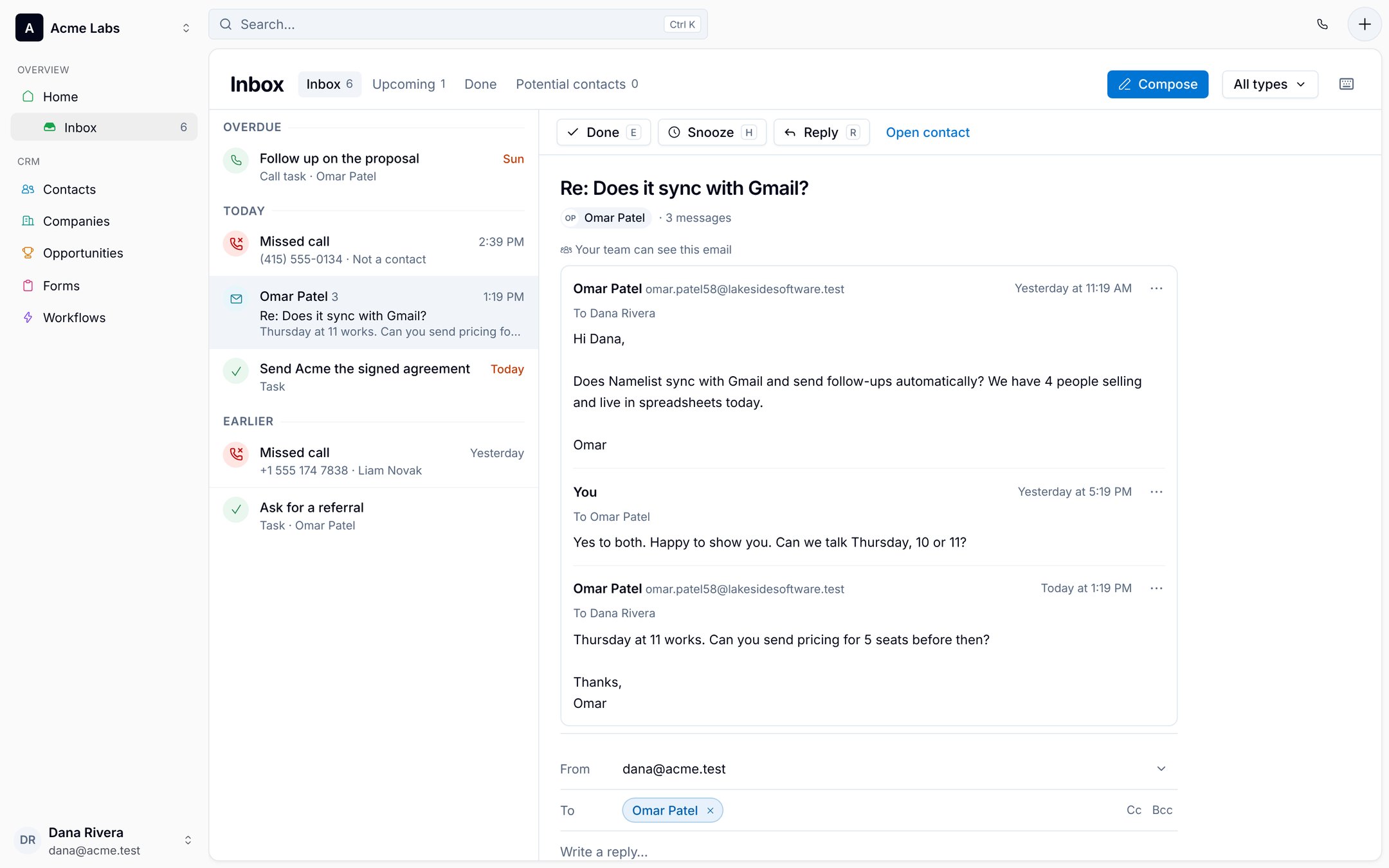
Inbox
Start every morning knowing exactly who needs you.
Replies, due follow-ups, missed calls and tasks in one list. Clear it, and you've done your selling for the day.
- Gmail syncs both ways. Reply from Namelist and it sends from your own address.
- Done, Snooze and Reply from the keyboard. Inbox zero, sales edition.
- Strangers who email you wait in Potential contacts, never cluttering your list.
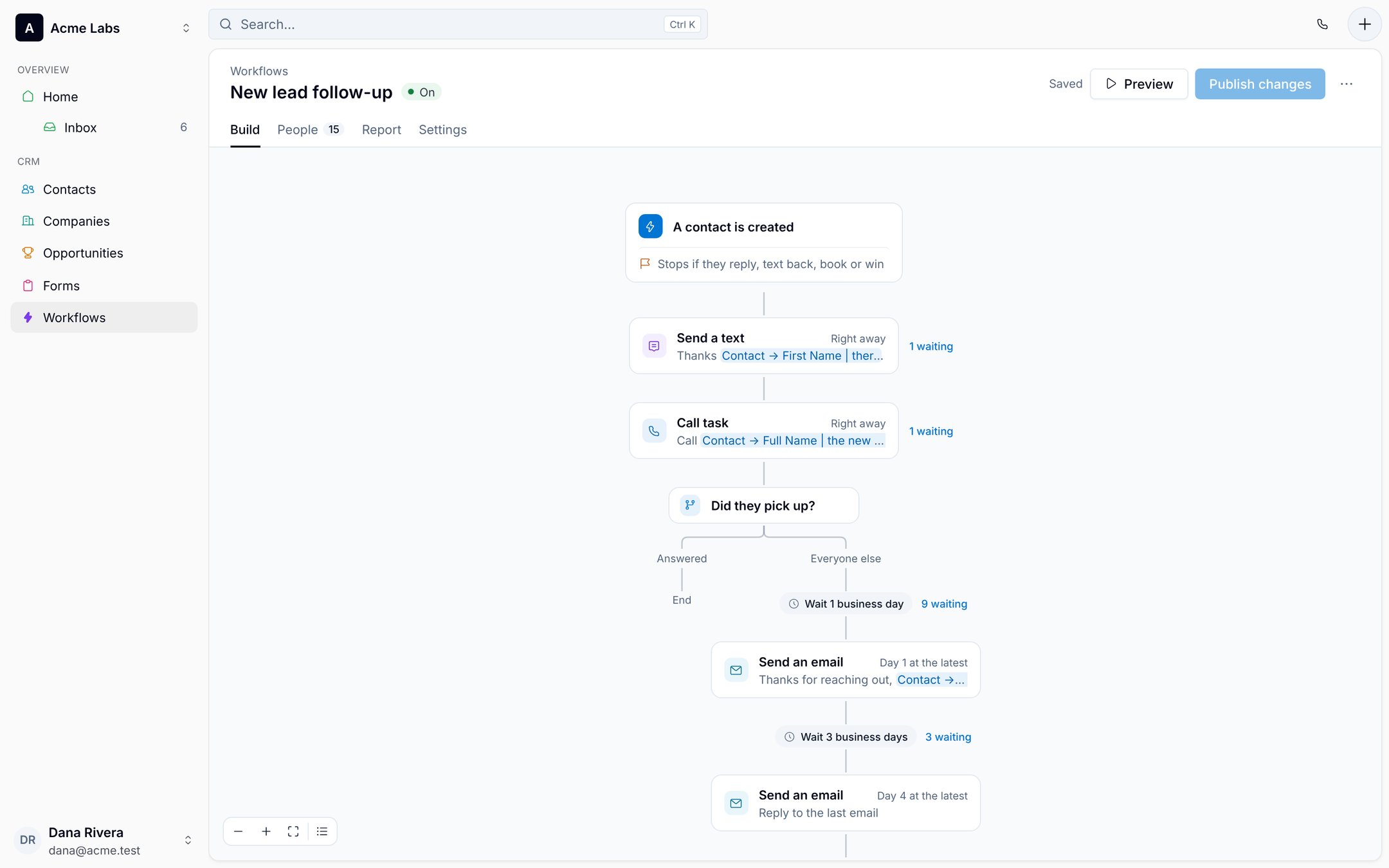
Workflows
Follow-up that runs itself, and stops the moment they reply.
Build the sequence you'd send if you had time: texts, emails from your Gmail, waits, branches and call tasks for the moments only you should handle.
- Stops if they reply, text back, book or win, so nobody gets nudged after saying yes.
- Waits count business days, and you see who is waiting at every step.
- Preview before you publish; edits to a live workflow wait for Publish.
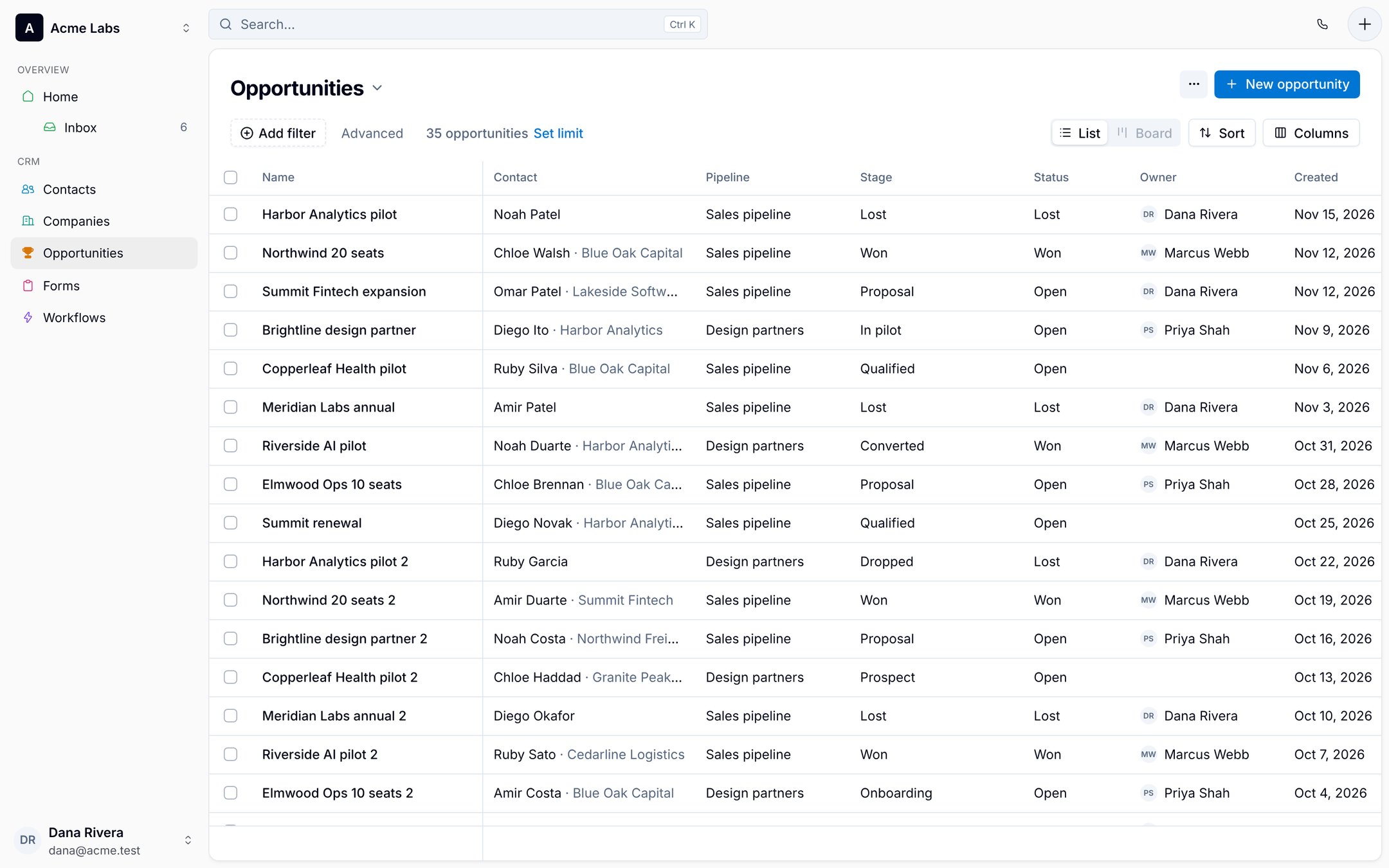
Opportunities
Know what will close this month without digging through a spreadsheet or a Notion board.
Every deal with its contact, company, stage and owner. Filter, sort and save the views you check before every investor update.
- Several pipelines: customers, design partners, even your fundraise.
- List or board, with saved views for each teammate.
- Custom fields for ACV, source, seats, whatever your process needs.
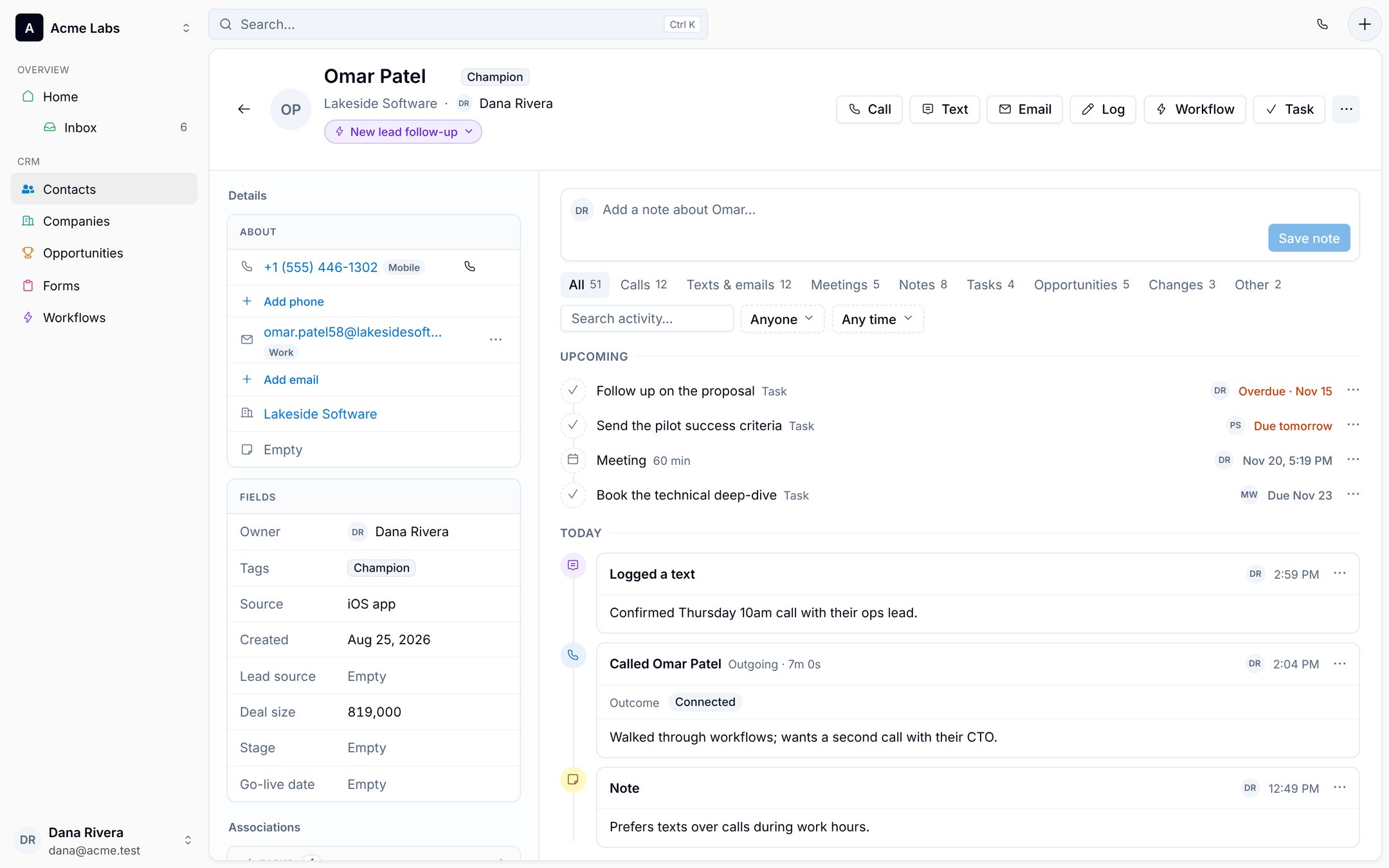
Every contact, in full
Call, text or email in one click, with the whole history beside you.
Calls from your business line, texts, emails, meetings and notes land on one timeline. The next person who talks to this lead knows everything you know.
- Call from the browser or the app, with the outcome logged on the timeline.
- Upcoming tasks and meetings at the top, so the next step is never a guess.
- Add them to a workflow from the same header.
Lead forms
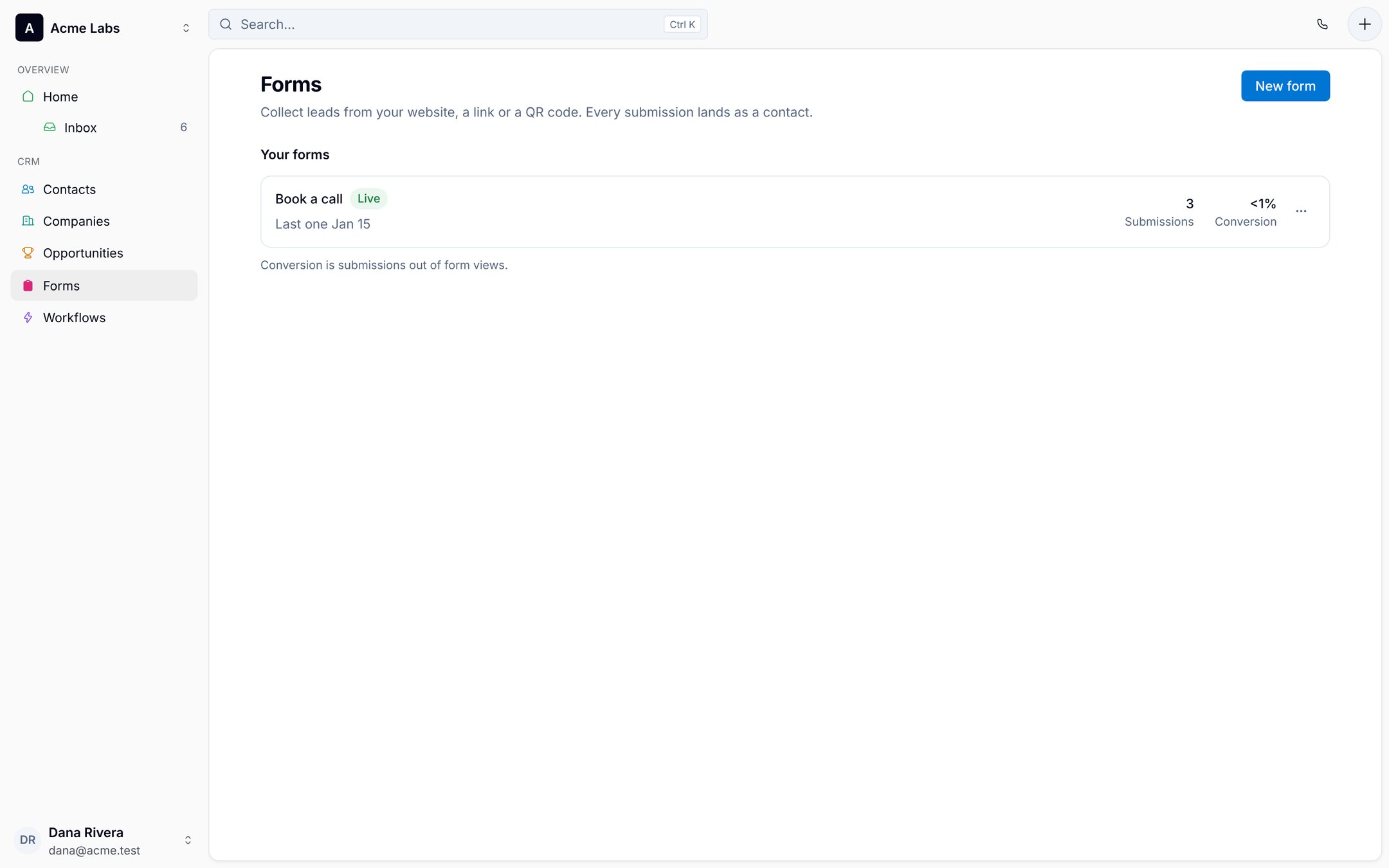
Website visitors become contacts, with a follow-up already running.
Collect leads from your website, a link or a QR code. Every submission lands as a contact and can start a workflow.
- A hosted page, or one line of code for your site.
- Submissions and conversion for every form.
- No separate form tool to pay for.
Reports
See what's working before your next board meeting.
Calls, texts, meetings and deals for any date range, for you or each rep. Spot the week the pipeline went quiet while it can still be fixed.
- Activity by person, so the Monday pipeline meeting takes ten minutes.
- Co-founders and investors watch for free as read-only users.

And everything else a small team needs
Smart lists
"No reply in 7 days" builds itself. Get a push when someone joins it.
Mass texting
Text a whole list at once, each message with their own name.
Business line
A second number with call recording. Missed in the app, it rings your cell.
Calendar sync
Meetings from Google Calendar show up on each contact.
Companies
Everyone you know at an account, with its deals and history.
Files
Proposals and contracts on the contact, attachments saved from email.
Templates
Your best emails and texts, one click away for you and your reps.
API and MCP
API keys for your own tools, and a server your AI assistant can use.
Mobile
Sell from the conference floor, the Uber and the coffee line.
The full CRM on iPhone and Android, not a companion app. Log the call, text the follow-up and move the deal before you've left the building.
- Scan a business card into a contact with a follow-up attached
- Your business number rings in the app, with caller ID for every contact
- Text a whole smart list from the event before you leave
Grows with you
From founder-led sales to your first sales hire, without starting over.
The CRM you set up alone is the one your team grows into. Every email, call recording and note stays on the account, so a new rep starts with your context instead of a cold list.
Month 1 · Just you
Your inbox becomes a pipeline
Connect Gmail, add deals from the threads that matter, turn on one follow-up workflow.
Months 2–6 · Founders
Co-founders sell from one view
Shared contacts, owners on every deal, nobody emails the same lead twice.
First hire
Hand off with the history
Change who owns an account and the history goes with it. Your recordings and templates become the playbook.
Board and advisors
Visibility without seats
Investors and advisors watch the pipeline as free read-only users.
Why founders switch to Namelist
Spreadsheets, Notion boards and Apple Notes break at the first follow-up. Enterprise CRMs are built for a VP of Sales with an ops team. Namelist is built for the person doing both jobs.
| Sheets, Notion or Apple Notes | Enterprise CRM | Namelist | |
|---|---|---|---|
| Time to set up | Minutes | Weeks, often a consultant | An afternoon |
| Email logged automatically | No | With add-ons | Yes, two-way Gmail |
| Automated follow-up | No | Higher tiers | Included |
| Calling and texting | Your personal phone | Separate tool | Business line built in |
| Full mobile app | No | Limited | iPhone and Android |
| Meetings needed to pick it | 0 | 6, plus a procurement form | 0 (this page counts) |
Founders who stopped losing deals
Founders and their teams who stopped losing leads to spreadsheets, inboxes and clunky CRMs.
Pricing that doesn't break the bank
Try it free for 14 days, then pay only for the people who sell. Co-founders, investors and advisors who just want to look are free on every plan.

Namelist
14-day free trial$9per seller / month
Billed $108 per seller, once a year.
Less than the coffee you drank pretending to update the Notion board.
Everything you need to catch every lead, follow up on time and close more deals, for every seller on your team.
- Gmail and calendar sync
- Follow-up workflows
- Pipelines and custom stages
- Business line and call recording
- Mass texting
- Lead forms
- Smart lists and smart fields
- Reports and goals
- iPhone, Android and web apps
- API and MCP
- $0 read-only seats
Cancel anytime during the trial.
Enterprise
Custom pricingStarting at
$79.99per user / month
Billed yearly.
For larger teams that need single sign-on, tighter controls and a person to call when it matters.
- Everything in Namelist
- Single sign-on (SAML and OIDC)
- SCIM user provisioning
- Roles, permissions and audit logs
- Uptime SLA and priority support
- Dedicated success manager
- Onboarding and data migration
- Security review, DPA and custom terms
- Invoicing and annual billing
- $0 read-only seats
We'll build a plan around your team.
Questions founders ask
Something else? Email hello@namelist.app and a founder replies.
Who is Namelist for?
Founders who are still the main salesperson, and the first few people who sell with them: usually pre-seed to Series A, selling by email, phone and meetings.
My leads live in a spreadsheet, a Notion database and Apple Notes. How long does switching take?
Export the sheet or the Notion database to CSV, import it and connect Gmail; the Apple Notes stragglers take a few minutes by hand or from your phone's contacts. Most founders are working their pipeline the same afternoon.
Will this replace my spreadsheet, Notion board and Apple Notes?
Yes. Import them, then hold a small funeral. Your contacts, deals and notes come with you; the color-coding you invented at 1am does not.
Will it work with my Gmail?
Yes. Your mailbox syncs both ways, replies you send from Namelist go from your own address, and you choose which domains to skip.
Do I need a sales ops person?
You are the sales ops person. That's why there's nothing to configure beyond your stages and one workflow.
Why not just use HubSpot or Salesforce?
They're built for sales orgs with admins. Namelist gives a small team email sync, follow-up workflows, calling and mobile in one plan at $11 a seller.
What happens when I hire my first rep?
Invite them and change who owns the accounts. They see every email, call and note, and your templates and workflows keep running.
How does the free trial work?
You get every feature free for 14 days. After that it's $11 per seller a month, or $108 a year. Read-only users are always free.
Does it work on Android and the web?
Yes. Namelist runs on iPhone, Android and the web, and your contacts, tasks and deals stay in sync across all of them.
Your next customer is already in your inbox.
Connect Gmail and see who you should have followed up with. 14 days free, then $11 per seller a month.